Hushhh: Dictation on the Caps Lock Key
I built a Mac dictation app in about a day. Press Caps Lock, talk, and your words appear at the cursor in any app.
This blog post was dictated with Hushhh, a new Mac app I built in a day.
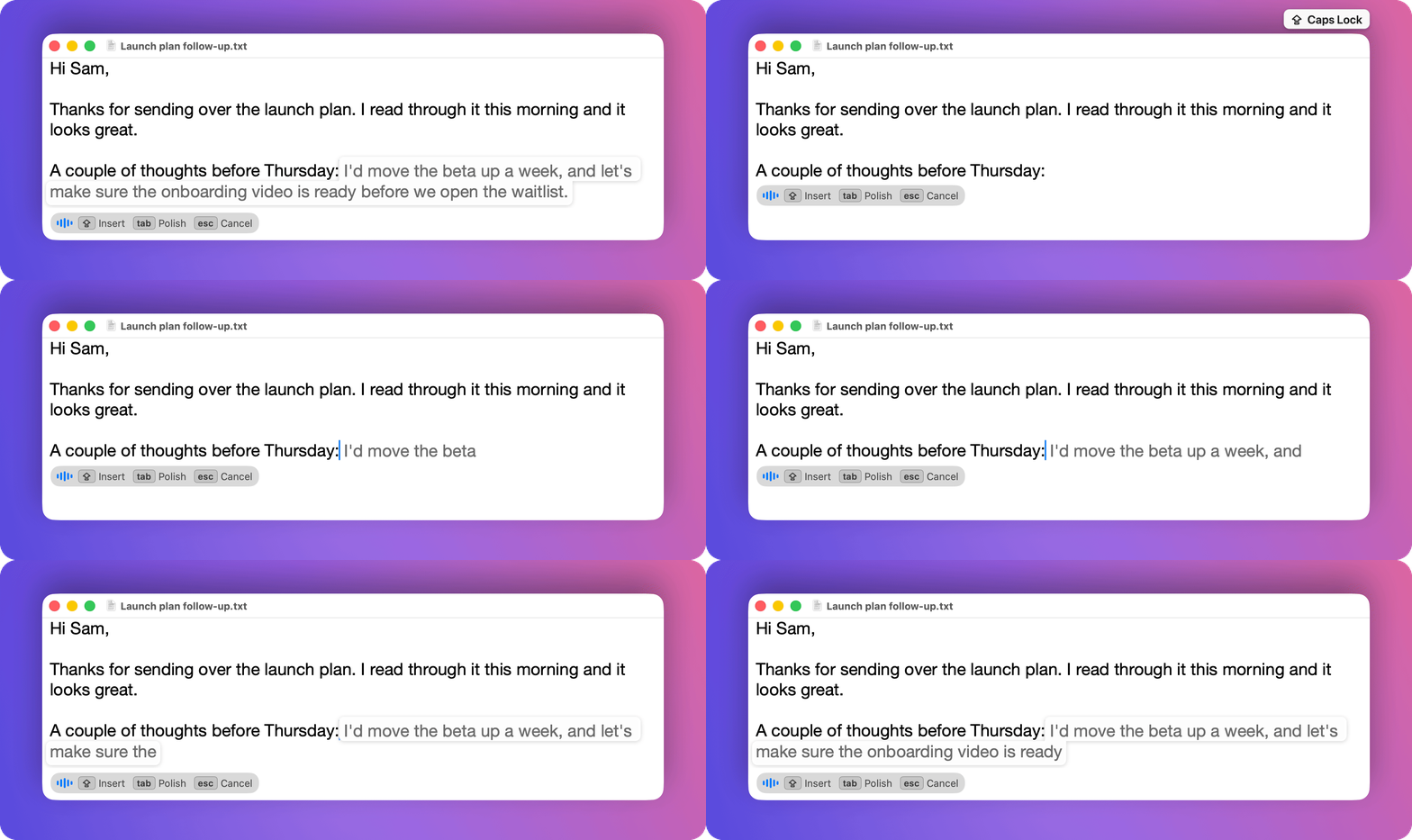
The idea was to take some of the concepts of Wispr Flow and fit them more seamlessly into the apps I use every day. I wanted the tool to stay hidden away and take up no UI. And I wanted to use the Caps Lock key, which takes up a lot of space on my keyboard but is very rarely used.
The UI is simple, press Caps Lock and talk, and your words appear as grey ghost text right at the cursor. Press Caps Lock again to insert them, Tab to polish them with a language model first, or Esc to cancel. Speech recognition runs on your Mac.
In the span of about a day, I was able to prototype, tweak, and ship the first version. It’s certainly not perfect, but the fact that I can build a voice dictation app with on-device speech recognition, plus the ability to polish the text with a modern LLM, in a day is astounding.
Check out Hushhh on GitHub. It should be pretty easy to install, and I’d love your feedback.
Comments